For ChatGPT, Claude and Grok
The Content
Overlap System
Find the overlap between what you're already saying and what's performing on social media.
What you're already saying


Calls · Slack · emails · trainings

Your AI
What's performing on social
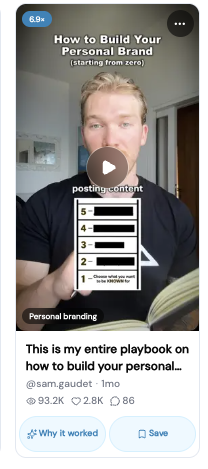
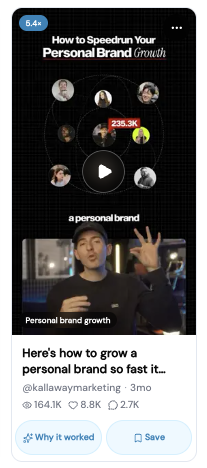
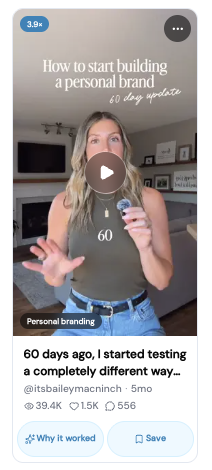
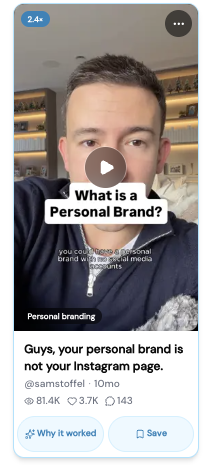
670,000+ outlier videos, updated daily
Your AI
Step 1 · Internal data
Connect what you're already saying
Claude: Settings → Connectors, find the app, click Connect and sign in.
ChatGPT: Settings → Connectors (called Apps on some accounts), find the app, click Connect and sign in.
Slack
Customer threads, team questions, the things people keep asking.
Granola
Your call notes and transcripts.
Zoom
Call recordings and summaries.
Can't find Zoom in the list? Your notetaker already has the transcript.
Fathom
Call transcripts, summaries and action items.
Not listed? Add https://api.fathom.ai/mcp as a custom connector, the same steps as TopicFinder below.
Notion
Trainings, SOPs and playbooks.
Google Drive
Docs, slides and past scripts.
Step 2 · External data
Connect what's performing on social
TopicFinder gives your AI 670,000+ Instagram videos, every transcript and why each one worked. Pick your app. The address is the same for all three, and you only do this once.
01 · About a minute
Connect ChatGPT
Your connect address. Same for every app.
https://app.topicfinder.ai/mcp- 1
In ChatGPT, open Plugins, click +, then Add custom MCP server.
- 2
Name it TopicFinder and paste the address above.
- 3
Choose sign-in (OAuth), accept the warning, and click Create. Sign in with your TopicFinder account and press Allow.
- 4
In a new chat, type @ and pick TopicFinder.
ChatGPT moves these menus often, and custom servers need a paid plan. On Business or Enterprise, an admin has to allow it first. If you get stuck, search ChatGPT's help center for "custom MCP server." If TopicFinder doesn't show up inside a ChatGPT Project, use a normal chat and type @ to pick it.
02 · About a minute
Connect Claude
Your connect address. Same for every app.
https://app.topicfinder.ai/mcp- 1
In Claude, open Customize then Connectors.
- 2
Click Add custom connector.
- 3
Name it TopicFinder and paste the address above.
- 4
Click Add, then Connect. Sign in with your TopicFinder account and press Allow.
- 5
In any chat, open the + menu, go to Connectors, and make sure TopicFinder is on.
- 6
The first time Claude uses TopicFinder, it asks permission. Choose Always allow so your weekly run doesn't stop to ask.
On a Team or Enterprise plan, an owner adds it once under Organization settings → Connectors. Then each person clicks Connect.
03 · About a minute
Connect Grok
Your connect address. Same for every app.
https://app.topicfinder.ai/mcp- 1
Open Grok and start a new chat.
- 2
Paste the address above and tell Grok to add it as an MCP server, or copy the message below.
- 3
When Grok asks, sign in with your TopicFinder account and press Allow.
- 4
Ask it what's winning in your niche this week.
Paste this into Grok
Add https://app.topicfinder.ai/mcp as an MCP server and connect my TopicFinder account.No settings menu. Grok reads the address and connects on its own.
Step 3 · The prompt
14 videos in 30 minutes
Once you've connected all your apps, run this prompt in your AI system to get your 14 days of content.
The Content Overlap prompt
You are my content strategist. Two sources are connected to you:

INTERNAL: what I'm already saying. My customer calls (notetaker transcripts), Slack threads, emails, trainings and past content.
EXTERNAL: what's performing on social. TopicFinder, with Instagram's outlier videos in my niche, their transcripts and why each one worked.

My niche: [niche]
Who I help: [audience]
What I sell: [offer]
Don't post about: [topics to skip]

Do all five steps without stopping. If a tool fails, try once more another way, then keep going.

STEP 1: WHAT I'M ALREADY SAYING
Read the last 30 days of my calls, Slack and emails. List the 15 questions, objections and problems that come up most. For each: how often it came up, and one line I actually said about it, in my words.

STEP 2: WHAT'S PERFORMING
In TopicFinder, find the top 25 outlier videos in my niche from the last 90 days (highest multiple first). For each: topic, hook, format, and why it worked.

STEP 3: THE OVERLAP
Score every internal topic against the outliers from 1 to 10 for how closely they match. Keep the 14 strongest. A topic only qualifies if it appears on BOTH sides. Drop anything I posted in the last 30 days.

STEP 4: THE 14 VIDEOS
For each of the 14, in a table: day (1 to 14), topic, the outlier it's modelled on (handle + multiple), a hook in my voice built from my own words in step 1, three talking points, format (talking head, screen, list or story).

STEP 5: THE PLAN
Order the 14 so no two days in a row use the same format or angle. Put the strongest hook on day 1. End with the three topics that scored highest overall and why.
Get access
Your AI is ready. Plug it in.
Get access to TopicFinder, connect your AI in about a minute, and run the overlap this week.
FAQ
Questions
A way to decide what to post. Your AI reads what you're already saying (calls, Slack, emails, trainings) and what's performing on social (TopicFinder's Instagram outliers), then finds where they overlap. That's the video to make next. Run the prompt once and you get 14.
Any plan. AI apps come with Plus, Pro and Founder.
MCP (Model Context Protocol) is how AI apps plug into outside tools. TopicFinder's MCP server is the address on this page. Once it's connected, your AI searches TopicFinder's library from inside the chat, the same way you would.
It reads your library and saves what you ask it to. It never posts, and never deletes your scripts or videos.
TopicFinder does: the Grok steps are on this page. Grok doesn't connect to Slack or your notetaker yet, so paste the call notes or thread into the chat and run the prompt the same way.
In TopicFinder, open Settings. On the Account tab, find Connect to your AI and press Disconnect next to the app. Its access ends right away.